What a great email signature platform looks like: 12 features every buyer should demand
1 April 2026
0 min read
Email signatures don’t usually get much attention. They sit at the bottom of every message, quietly doing their job.
But across an organization, they add up fast. Hundreds of employees. Thousands of emails every day. Each one carrying your brand, your contact details, and often your legal obligations.
Without a clear way to manage them, signatures become inconsistent, outdated, or incomplete. IT ends up fixing issues manually. Marketing loses control over how the brand appears. Compliance becomes harder to enforce.
An email signature management platform is designed to solve that. But not all platforms solve the same problems, or to the same standard.
This guide breaks down what a strong platform actually looks like, and the features that matter when you’re choosing one.
What is an email signature platform?
An email signature platform is a centralized system that manages and automates email signatures across an entire organization. It applies consistent branding, contact details, and legal disclaimers to every email—regardless of who sends it or what device they use.
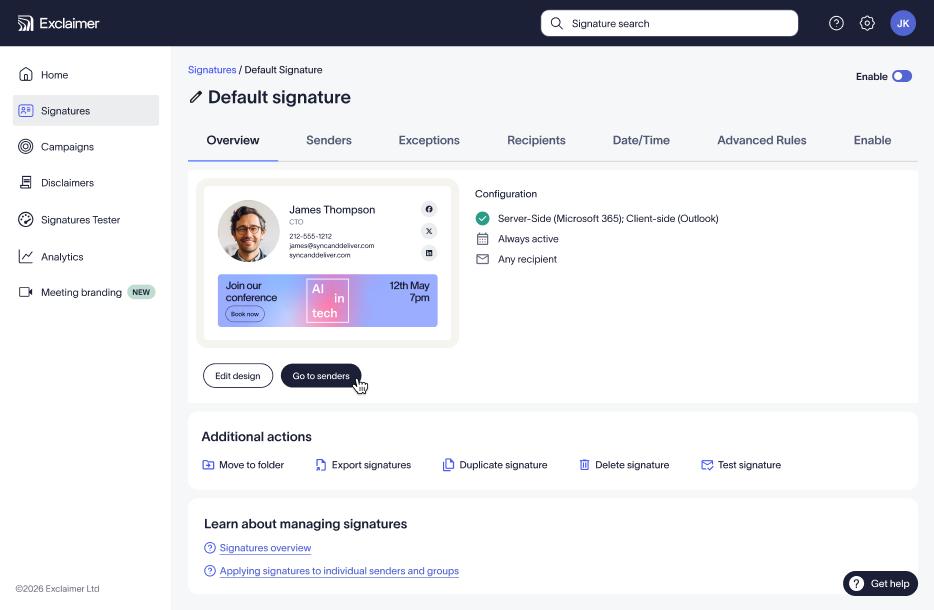
Instead of relying on employees to create or update their own signatures, the platform handles everything automatically. IT teams maintain control, while marketing and other teams can adjust their own messaging within set guardrails.
At its core, it solves a simple problem that becomes complex fast: making sure every email looks right, stays compliant, and reflects the business accurately.
Why email signatures matter more than most teams realize
Email remains one of the most widely used business communication channels. Each employee may send a dozen or more emails every day, amounting to hundreds or thousands of impressions.
That creates a high-frequency touchpoint that few other channels can match.
Each email signature:
Reinforces your brand—or damages it
Carries key contact details
Creates an opportunity to drive action
Yet in many organizations, signatures are still treated as an afterthought. That gap between potential and reality is where the right platform makes a difference.
Why managing email signatures becomes complex at scale
Managing signatures across a very small team may be doable. But at scale, it breaks down quickly.
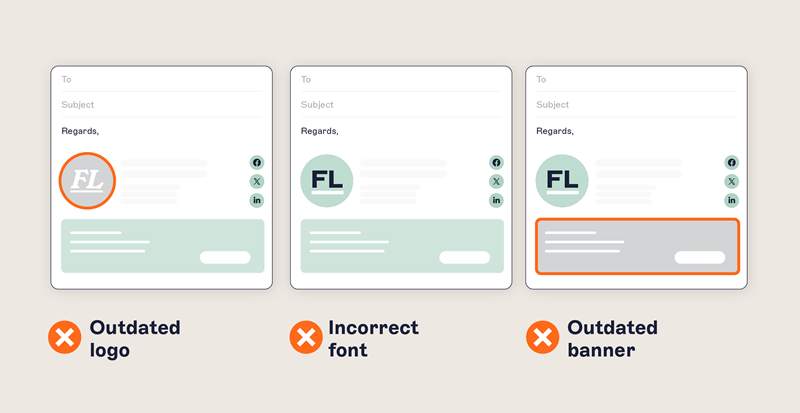 Common challenges include:
Inconsistent branding: Employees may use off-brand fonts and colors, as well as outdated logos
Manual updates: Every change requires IT involvement or user action
Missing disclaimers: Legal requirements aren’t applied consistently
Device fragmentation: Signatures look different across desktop, web, and mobile
Support overhead: IT spends time fixing signatures instead of focusing on higher-value work
Without centralized control, these issues compound. Branding suffers, compliance risk increases, and manual updates create ongoing work.
What a great email signature platform looks like
A strong email signature management platform addresses each of these problems, giving you control, flexibility, and the ability to scale without adding complexity.
Here are some of the most important email signature management features, grouped by function:
Control and governance
1. Centralized signature management
With a centralized approach, all signatures are managed through one platform. Updates happen once and apply everywhere.
This eliminates:
The need for manual edits
Inconsistent messaging and branding
Dependency on individual users
2. Automatic policy enforcement
Consistency breaks down when users are responsible for applying rules themselves. The best email signature platforms remove that dependency entirely.
Look for platforms that apply required elements like disclaimers, branding, and formatting automatically to every email. Policies should be followed by default, not by exception—this is critical for both compliance and brand control.
3. Role-based access control
While central oversight is crucial for consistency, allowing other teams to manage certain aspects of their signatures can help reduce the number of tickets that flow through IT.
With role-based access, marketing can update campaign banners as needed, while HR can use signatures to share internal announcements. IT retains control over structure, data fields, and compliance elements.
This creates a clear boundary between flexibility and governance, so changes can happen quickly without introducing risk.
4. Auditability and compliance tracking
When email is part of regulated communication, visibility matters.
A strong platform gives you a record of what was deployed, when it changed, and how it was applied. This makes it easier to support audits, validate compliance requirements, and avoid guesswork when something needs to be reviewed.
Deployment and compatibility
5. Server-side signature deployment
With server-side deployment, signatures are applied after the email is sent, not just within the user’s email client. That means every email gets the correct signature, regardless of device, location, or user behavior.
Without this, consistency depends on users setting things up correctly, which rarely holds at scale.
6. Cross-platform support
Email doesn’t live in one environment. Most organizations operate across multiple platforms and devices.
A reliable email signature platform supports Microsoft 365, Microsoft Exchange, Google Workspace, and all common email clients, including mobile. More importantly, it delivers a consistent signature experience across all of them, so formatting and content don’t break depending on how an email is sent.
7. Real-time updates
When signatures can’t be updated instantly, changes get staggered, missed, or applied inconsistently.
A strong platform removes that lag. Updates are pushed live immediately across all users, so branding, messaging, and compliance changes take effect without rollout cycles or manual intervention.
Branding and design
8. Centralized brand control
Email signatures are an extension of your brand. But without control, they rarely reflect it accurately.
A centralized system allows you to define and enforce design elements like logos, colors, fonts, and layout in one place. This keeps every email aligned with brand standards, regardless of who sends it or where they’re based.
9. Template-based design system
Templates make consistency scalable. Instead of creating email signatures individually, you define structured layouts that can be applied across teams, regions, or roles.
Ideally, you’ll want an approach to templates that can accommodate variations—by department, for instance—while maintaining a consistent overall design.
10. Dynamic content and visual elements
Modern email signatures go beyond static contact details. A strong platform supports dynamic elements like campaign banners, social links, or rotating content.
These elements can be updated centrally and displayed consistently, turning signatures into active communication space rather than fixed footers. Used well, this creates a subtle but persistent channel for messaging.
Campaign and targeting capabilities
11. Audience targeting and segmentation
Targeting allows you to tailor signature content based on attributes like department, location, or customer type. For example, sales emails might promote a product demo, while customer success emails highlight support resources.
This level of segmentation increases relevance and can even help maintain compliance with regional regulations.
12. Campaign scheduling and control
Marketing campaigns should be easy to launch, update, and retire.
A strong email signature platform allows you to schedule updates in advance, launch campaigns at specific times, and swap messaging without manual effort. This keeps content current and aligned with broader marketing activity, without relying on coordination across teams.
How to choose the right email signature software
Not all signature management platforms offer the same level of control or capability. When evaluating a potential tool, focus on what matters most—and pay attention to what’s missing:
Must-have capabilities
Centralized management
Server-side deployment
Cross-platform support
Role-based access
Real-time updates
Questions to ask vendors
Can signatures be applied without user involvement?
Does it work across all devices and clients?
How are updates managed and deployed?
Can different teams manage their own content safely?
Red flags
Requires users to set up or update signatures
Limited support for mobile or cloud email platforms
No centralized control
No compliance or audit capabilities
The bottom line
Email signatures appear on every message your organization sends. That makes them one of the most consistent and visible communication touchpoints you have.
Without the right email signature management platform, they create inconsistency, risk, and unnecessary work.
With the right platform, they become something else entirely: a controlled, scalable way to maintain brand standards, meet compliance requirements, and make every email more effective.