On-premises to cloud: A modern guide To email signature management
10 December 2025
0 min read
TL;DR
Cloud adoption is rising as organizations move away from aging on-premises systems that require heavy maintenance and ongoing updates.
Email remains the primary business communication tool, making consistent, accurate signatures essential for branding and compliance.
On-premises email signature tools limit scalability, flexibility, and long-term support as vendors retire older server products.
Cloud-based signature management centralizes control, reduces IT workload, and applies updates instantly across all users and devices.
Cloud platforms improve branding, compliance, collaboration, and integration with tools like CRM and marketing applications.
Moving email signatures to the cloud helps organizations stay adaptable and maintain a reliable communication environment.
Email continues to be the foundation of business communication. Every message your organization sends shapes how people see your brand. A well-managed email signature plays a central role in that experience. It signals professionalism, reflects your identity, and supports how your teams communicate internally and externally.
This guide explains why many organizations are moving away from on-premises systems and adopting cloud-based email signature management. It covers:
The limitations of maintaining on-premises tools
The broader advantages of cloud-based platforms
The benefits of moving from an on-premises signature solution to a cloud deployment
Why cloud email signature management provides a strategic advantage for IT and the wider business
How signatures support communication, compliance, and brand consistency
By the end, you’ll see why cloud-based email signature management has become the standard for modern organizations and how it helps IT teams deliver consistent, reliable, and scalable signature experiences across all users and devices.
The state of cloud adoption
Cloud adoption has accelerated across every industry. Most organizations now rely on cloud services as part of their core IT infrastructure, and usage continues to grow. Research shows that 94% of enterprises use cloud technologies, and the average organization works with more than a thousand cloud services in day-to-day operations.
This shift is especially clear within Microsoft environments. Over the past few years, many organizations running on-premises Exchange have moved to Microsoft 365 to reduce maintenance, improve reliability, and support a more distributed workforce. Adoption of Microsoft 365 rose from 57% in 2020 to 84% in 2023, reflecting a clear move toward cloud-based productivity platforms.
This rapid expansion isn’t accidental. It’s driven by the advantages the cloud offers to both IT and the wider business. For smaller organizations, it removes the burden of maintaining hardware and keeping pace with updates. For enterprises, it adds scalability, operational resilience, and the flexibility required to support global teams.
As organizations consider their own cloud strategy, many evaluate cloud migration based on two categories of outcomes:
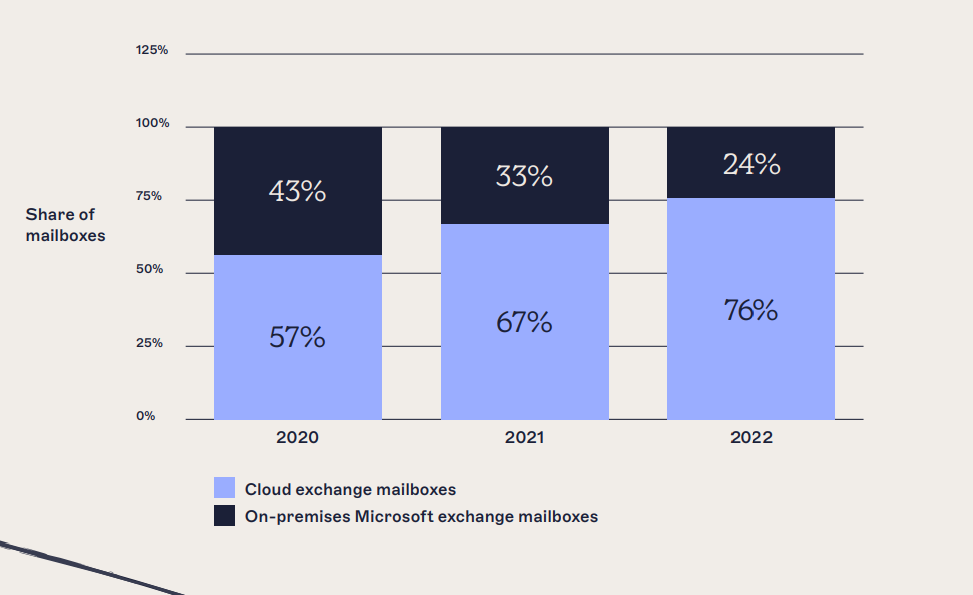
Which of the following are the most important IT outcomes your organization expects/has experienced as a result of migrating to cloud?
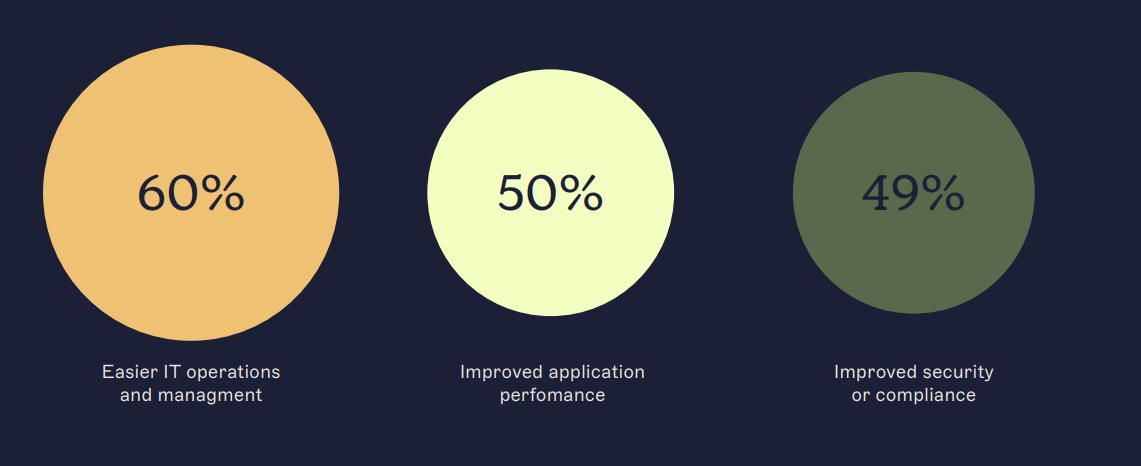
Reduced infrastructure maintenance
Faster deployment of updates and configurations
Improved service resilience
Better support for hybrid and remote work
Stronger administrative control across platforms
Which of the following are the most important business outcomes your organization expects/has experienced as a result of migrating to cloud?
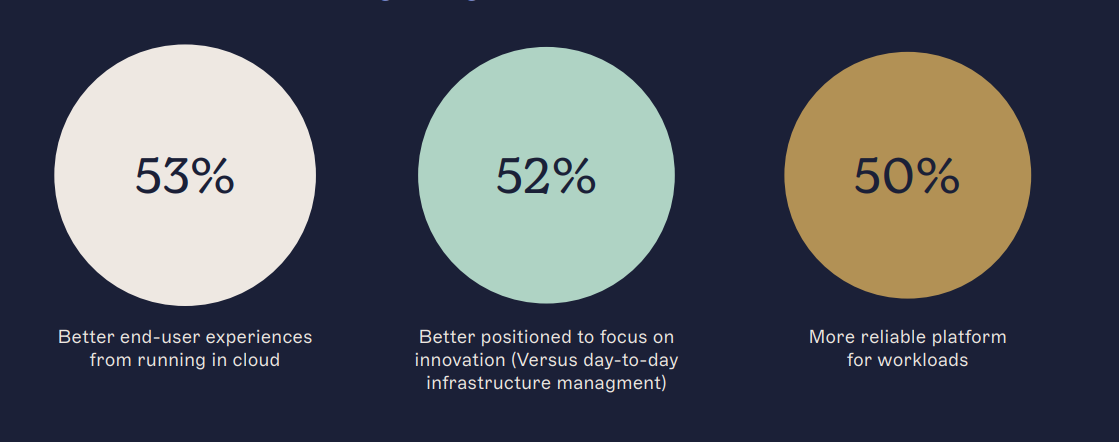
Greater operational efficiency
More predictable operating costs
Better scalability as teams grow
Improved user experience
Stronger alignment across communications and brand touchpoints
These outcomes explain why cloud adoption continues to expand—and why more organizations are reviewing which on-premises systems should transition next.
Forrester, ‘State Of Public Cloud Migration, 2022’
The continued dominance of email and the importance of email signatures
Organizations have adopted many new communication channels, yet email continues to be the primary way businesses connect with customers, partners, and internal teams. It’s universal, traceable, cost-effective, and flexible. People rely on it for detailed conversations and for sharing files, contracts, and critical information. That’s why email remains the most trusted communication method in business.
Because email plays such a central role, every message contributes to how people perceive your organization. Each email is an opportunity to present a consistent, professional image. Elements such as your logo, website, and marketing materials all help communicate who you are. And your email signature is part of that same experience.
A well-designed email signature works like a digital business card. It gives recipients the information they need while reinforcing your brand. More importantly, when signatures are managed centrally, they become a reliable way to maintain consistency across the entire organization.
Effective signature management supports:
Consistent branding across every employee, regardless of device, platform, or location
A professional and unified appearance in every message, strengthening credibility and creating opportunities for brand engagement
The inclusion of correct legal disclaimers, which supports compliance requirements in regulated environments
This guide explores how cloud-based email signature management helps organizations achieve these outcomes at scale. It also explains why many IT teams are moving away from managing signatures on-premises and adopting cloud platforms that offer greater reliability, control, and flexibility.
Email signature management: Why you can't stay on-premises forever
On-premises email signature management relies on software installed and maintained on your organization’s physical servers. While this approach was once standard, it brings several limitations that slow teams down and create long-term operational challenges.
 One of the biggest issues is the amount of maintenance on-premises systems require. IT must apply updates, monitor performance, and troubleshoot deployments across servers and devices. This takes time away from more strategic work. Manual updates also introduce risk—a small configuration error can lead to inconsistent signatures, compliance gaps, or broken formatting across users.
Scaling is another challenge. As organizations grow, on-premises systems often need additional hardware or infrastructure changes to support more users or new requirements. These upgrades are costly, complex, and slow to deliver. In contrast, cloud platforms scale instantly without disrupting existing workflows.
There’s also the question of longevity. The industry continues to move toward cloud-first architectures, which means support for on-premises tools is decreasing. Microsoft ended support for Exchange 2013 in 2023, and Exchange 2019 reached end of support in October 2025. As these systems age, organizations are left with fewer update paths, shrinking support windows, and increased exposure to operational risk.
The same trend applies to on-premises email signature software. Modern communication environments require flexibility, reliability, and centralized control across devices and platforms, which on-premises tools struggle to provide. Cloud-based email signature management removes these constraints by offering continuous updates, simplified administration, and the scalability needed for hybrid and remote teams.
Moving to the cloud is a practical step toward maintaining a consistent, controlled, and future-ready communication experience across the entire organization.
Learn more about Microsoft Exchange SE and what to do if you're running a legacy Exclaimer solution.

The power of cloud-based email signature management
Cloud-based email signature management centralizes how organizations create, update, and control email signatures. Instead of installing software on local servers and maintaining it over time, IT teams use a single, cloud-hosted platform that applies signatures consistently across all users and devices. This shift delivers clear benefits for organizations evaluating a move from on-premises to cloud environments.
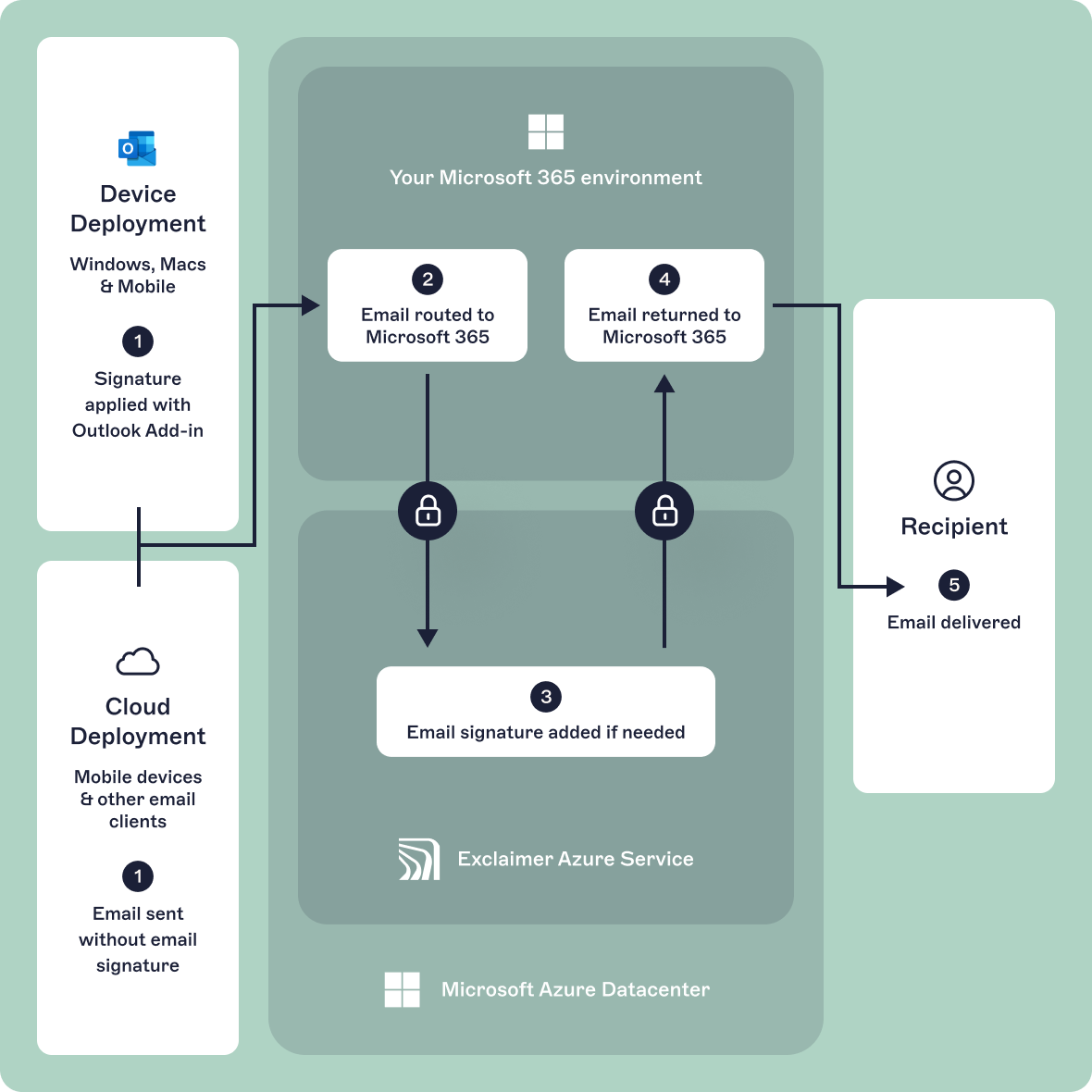 Cloud platforms give teams access from anywhere, which means signature management is no longer tied to a single server or device. Marketing can update designs, campaigns, and brand elements without needing access to infrastructure. IT, meanwhile, keeps full administrative oversight and avoids the complexity of manual deployments.
A cloud-based approach also adapts easily as the organization changes. Adding new users, supporting a rebrand, or opening new locations requires no additional infrastructure. Updates take effect instantly and apply to every message, regardless of where it’s sent.
Moving away from on-premises software reduces costs related to hardware, installation, and maintenance. It also removes a single point of failure and supports modern security practices. Cloud providers maintain high standards such as ISO/IEC 27001 and SOC 2, which are difficult for on-premises tools to match at scale.
Below are key areas where cloud-based email signature management offers clear advantages.
Benefits: Improving collaboration and customization
A cloud-based email signature solution creates a shared workspace where teams can work together without the barriers that exist in on-premises environments.
With a centralized platform:
Teams can update signatures from one place, giving everyone access to the same templates and controls
Marketing can design variations for different departments or locations, aligning communications with corporate branding
A/B testing becomes straightforward, helping teams measure engagement and identify the most effective designs
Integrations with cloud tools such as CRM and marketing platforms are easier, supporting more tailored communication
This approach turns email signature management into a connected part of the organization’s workflow instead of a task isolated within IT.

Benefits: Strengthening branding and compliance
A consistent brand builds trust, and email signatures play a large part in how recipients perceive your organization. Cloud-based management makes it easier to maintain uniform branding across every message.
With cloud signature management, organizations can:
Use dynamic fields that reflect each sender’s role, department, or location while keeping branding consistent
Add marketing elements such as banners, surveys, and social icons that rotate or update automatically
Apply different disclaimers for specific regions or regulatory requirements, ensuring messages meet local standards
This level of control helps maintain accuracy while supporting legal and compliance needs across diverse communication scenarios.

Benefits: Increasing security
Shifting to a cloud-based email signature management platform such as Exclaimer strengthens security by removing many risks associated with on-premises deployments.
Key security advantages include:
Advanced encryption during transmission and storage
Use of secure Azure datacenters with strong physical and digital protections
Granular access controls that define who can edit templates or manage content
Compliance with established standards, including SOC 2 Type II, ISO/IEC 27001, ISO/IEC 27018, GDPR, and HIPAA
These capabilities help protect sensitive data and support governance without adding complexity for IT teams.
Benefits: Cost and time efficiency
Cloud-based email signature management reduces the time and cost associated with on-premises software.
Organizations benefit from:
Lower infrastructure spend, since there is no hardware to acquire or maintain
Fewer manual tasks, including deployments and configuration updates
Automatic rollout of new features and improvements, which reach every user without intervention
Subscription-based pricing, offering predictable costs and the ability to scale as business needs change
For IT, this means fewer support tickets, less time spent on routine upkeep, and more bandwidth to focus on higher-impact work. For the wider business, it means a faster, more adaptable way to maintain consistent communication and branding.

Cloud-based email signature management: A practical next step
Cloud technology has changed how organizations manage their systems, and email signatures are no exception. Moving signature management to the cloud brings clear benefits: lower maintenance demands, reduced IT overhead, improved brand consistency, and quicker updates. It gives teams a reliable, scalable way to keep signatures accurate across every device and platform.
Adopting a cloud-based email signature solution gives your organization the flexibility needed in today’s digital workplace. It supports brand and compliance teams with consistent, centralized control while freeing IT from the routine tasks that come with on-premises systems. As business needs shift, updates can be made quickly and applied across the entire organization without disruption.
The move to the cloud is part of a broader change in how organizations manage communication tools. On-premises systems are aging, support windows are shrinking, and modern environments require a level of agility that those systems struggle to deliver. Cloud platforms provide the resilience, scalability, and administrative control required to support a distributed workforce.
This guide outlined why cloud-based email signature management has become the preferred approach for many organizations and how it fits into modern IT strategies. As you evaluate your next steps, consider how a cloud platform can simplify operations, strengthen branding, and improve your organization’s ability to adapt over time.
If you’d like to see how a cloud-based approach could work in your environment, our team can walk you through deployment options and best practices.
Get in touch with Exclaimer and let’s begin your journey to the cloud together.