Email signature surveys: How to collect customer feedback in every email
16 October 2025
0 min read
TL;DR
- Long surveys frustrate customers and hurt response rates—short, one‑click surveys embedded in email signatures make feedback effortless
- Email signature surveys turn everyday communication into a trusted, unobtrusive way to collect real‑time insights at scale
- They deliver higher response rates, better visibility, and faster feedback without interrupting the customer experience
- Use Exclaimer to add one‑click surveys to every email signature, capture actionable feedback instantly, and close the loop with ease
Did you know that 67% of customers said they don’t complete surveys if they are too long? But what if your everyday emails could collect feedback with a single click?

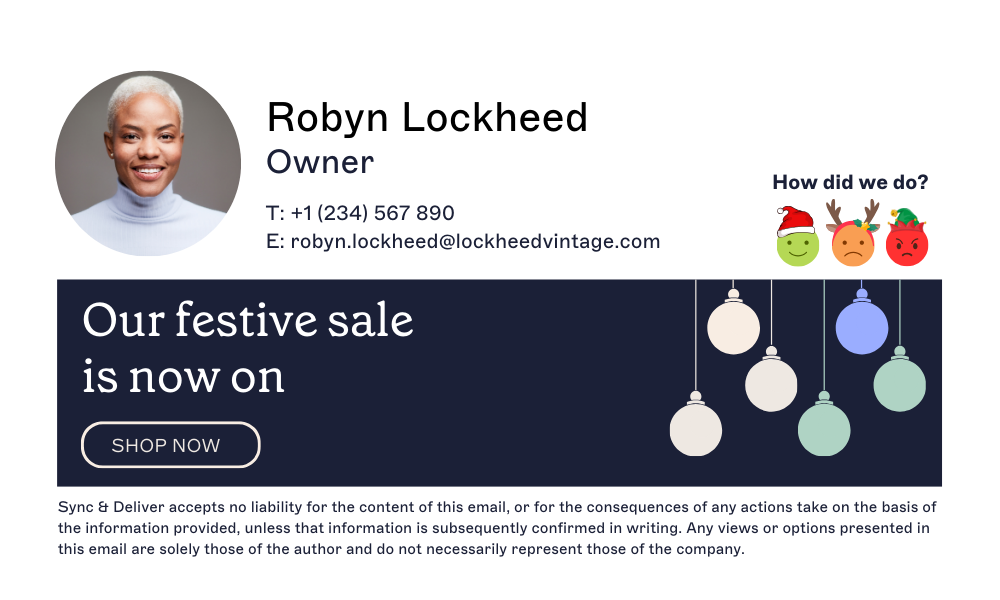
Companies of all sizes realize the importance of measuring customer satisfaction. An email signature survey lets customers share their experience with a single click. Instead of opening a long questionnaire, recipients can tap a simple icon or emoji at the end of your message to rate their experience instantly.
With a one-click survey in your email signature, you can:
Collect real-time customer insights with every interaction.
Increase response rates without interrupting the user journey.
Replace complex survey links with simple, trackable feedback buttons.
If you’re looking to improve how your company listens and responds to customers, start with the channel they already trust—email.
How does an email signature survey work?
An email signature survey is a fast, low-effort way to collect customer feedback directly from your everyday emails. All you do is add some one-click feedback buttons to your email signature design. Each button is assigned a link to measure the level of customer satisfaction; good, neutral, or bad. You don’t even need to write any survey questions.
 Here’s how it works:
Add one-click feedback buttons – Use familiar icons such as smiley faces, stars, or thumbs up/down. Each button links to a specific rating (positive, neutral, or negative).
Track responses automatically – When a recipient clicks, their response is captured instantly and recorded in your analytics dashboard.
View results in real time – Monitor satisfaction trends, identify recurring issues, and see where your teams are performing best.
This one-click feedback survey approach makes it easy for customers to rate their experience in seconds. And it turns every email into measurable insight.
Pro tip: A centrally managed email signature survey ensures that every employee email follows the same structure, links to the same feedback system, and provides consistent, reportable data across your organization.
The power of email signature surveys
Here are the main reasons why using an email signature survey is one of the simplest and most effective ways to gather feedback—and why it’s the perfect platform for one-click customer insight.
Email as a trusted feedback channel
When customers hear from you by email, it’s personal and credible. That trust disappears quickly with repeated survey requests, which often go ignored. In fact, even the best standalone surveys only see between 5 and 30%. Even worse, too many follow-ups risk unsubscribes or complaints.
Adding a one-click email survey to your email signature offers a more natural alternative. Customers can respond effortlessly while they’re already engaged in conversation. This subtle approach delivers more genuine, actionable feedback without overwhelming their inbox.
Why it matters: It strengthens relationships by gathering feedback through the most trusted business communication channel, the email inbox.
Large volumes, effortless reach
Anything displayed in every business email automatically reaches a wide audience. Embedding a one-click survey in your company’s email signatures ensures visibility across thousands of daily communications.
When feedback is quick and easy to give, participation rises. By making surveys part of the everyday exchange, you’ll see higher response rates and more representative data—no extra emails required.
Why it matters: Visibility drives volume and consistency means feedback accuracy.
Instant feedback at the click of a button
If you want fast feedback, one-click feedback buttons in an email signature survey are a great way to get rapid results. By embedding links into your template or using a third-party email signature software, you can easily obtain real-time customer insights with simple feedback buttons.
It's recommended that you keep the design of the buttons as simple as possible. This increases the chances of a click.
Why it matters: Simplicity increases response rates and centralized control keeps feedback consistent and compliant.
No more long surveys
Long surveys often go unfinished. Unless there’s a strong incentive, few people will complete a 20-minute questionnaire. An email signature survey removes that friction by replacing 20 minutes of questions with one second of action.
Customers can share how they feel instantly, without leaving their inbox. It’s a respectful, efficient way to collect honest feedback that shows you value their time as much as their opinion..
How to create an email signature survey
Adding a one-click email survey to your email signature is simple. It's also one of the easiest ways to collect meaningful customer feedback without extra tools or emails.
 Here’s how to set it up and make it count.
1. Pick one thing to measure
Start with a clear goal. Are you measuring customer satisfaction? Service quality? Product feedback?
Stick to a single question. Simpler surveys get better response rates, especially ones like, “How was your experience today?”
2. Use clean, clickable icons
Design plays a big role in response rates. Keep it simple with familiar icons such as stars, smiley faces, or thumbs up/down.
Each should link to a trackable URL or form that records the response automatically.
Pro tip: Don’t crowd your email signature template. The best surveys blend in without getting in the way.
3. Add it to your email signature
Insert the feedback icons into your email signature using your usual platform, or manage them centrally with Exclaimer.
With centralized email signature management, IT can roll out signature-based surveys and other elements across every employee and device in minutes. No gaps. No local edits.
4. Monitor results and respond
Feedback is only valuable when it leads to action.
Regularly check your email signature feedback data to spot trends, thank happy customers, and resolve recurring issues before they escalate.
5. Test and refine regularly
Experiment with new icons, question phrasing, or layout.
Even small adjustments can significantly increase engagement and completion rates.
Email signature surveys are a low-effort way to get real, usable insight from every customer interaction. When it’s built into your signature, feedback becomes part of the conversation and part of your strategy.
Using Exclaimer’s email signature software for instant feedback
Adding surveys to email signatures is a smart way to gather insight. Exclaimer's integration with Customer Thermometer makes them even smarter, giving you full control, instant results, and minimal overhead.

Here’s what Exclaimer + Customer Thermometer brings to the table:
1. Centralized management
Manage email signatures and one-click surveys from a central location. Exclaimer integrates with Microsoft 365 and Google Workspace to apply consistent signatures to every employee email automatically. The Customer Thermometer integration lets you use those signatures to measure customer sentiment, track NPS, and close the feedback loop.
Why it matters: IT teams stay in control while every department delivers consistent, on-brand communication.
2. Instant feedback, visible results
Every click is tracked automatically. Record responses as they happen, so you can identify trends, measure satisfaction, and share insights across teams instantly.
Why it matters: Real-time visibility helps Marketing and Customer Success act quickly on customer sentiment.
3. Built-in security and compliance
Exclaimer meets strict security standards, including ISO 27001 and SOC 2. Signature data is handled securely and in line with your company’s privacy policies.
Why it matters: Your feedback data stays protected without adding IT overhead.
4. Consistent branding, every time
Every survey reflects your brand. Exclaimer applies your fonts, colors, and logos automatically, keeping signature elements polished and professional.
It works across all devices—desktop, mobile, or webmail.
Why it matters: Unified branding reinforces credibility and enhances customer trust.
5. Fewer tickets for IT, more insight for CS
The Exclaimer + Customer Thermometer integration gives cross-functional teams control over surveys, reducing support tickets and manual signature edits. IT saves time while Marketing, Support, and CX teams gain a reliable source of feedback they can use to improve experiences.
Why it matters: Central automation frees IT to focus on higher-value projects.
6. Scales with your business
Whether you’re managing 50 signatures or 50,000, Exclaimer handles it. You can deploy the same survey across global teams, or customize it by location, language, or department.
It’s flexible where you need it, consistent where it counts.
Why it matters: Flexibility at scale keeps every survey compliant, consistent, and localized.
Turn everyday emails into real feedback
Every customer email is a chance to learn something if you know where to look. With an email signature survey, you can collect feedback as part of the conversation, not a separate task.
 Exclaimer makes it easy. You manage everything in one place, with consistent branding, secure data handling, and full control across every user and device.
Our integration with Customer Thermometer enables real-time insight into how customers feel—about support, service, or anything else you choose to measure. And your teams get better visibility into what’s working, where to improve, and how to stay connected.
Effortless to run. Easy to scale. Built for feedback that fits naturally into every interaction.
Learn more about Exclaimer or start your free trial to see the power of email signatures and instant feedback for yourself.