









Trusted by 80,000+ businesses worldwide
What Microsoft 365 does natively
Microsoft 365 has two built-in ways to put an email signature on outbound mail. Neither needs extra software, and for straightforward needs, either can be enough.
Per-user Outlook signatures
Each person creates their own email signature in Outlook, and roaming signatures can sync it across some Outlook apps. This works for individual sign-offs, but each email signature is set and edited by the user, not controlled centrally. Outlook vs Microsoft 365 for email signature management
Mail flow rule disclaimers
An administrator uses a mail flow rule to append a standard block of text to all outbound mail, applied server-side. It works for a single, uniform footer or legal line across the organization, whether that's a legal disclaimer or an email signature. Create an Office 365 email signature
:format(webp)/)

Keeping every email signature current
Setting up one email signature takes minutes. The ongoing work is keeping every user's email signature accurate and on-brand across thousands of mailboxes as the directory changes.

Mail flow rules: built for disclaimers, not full email signatures
A mail flow rule can stamp a basic disclaimer on outbound mail, the job it was built for. Asked to carry a full email signature with formatting and images, it often renders differently from the design marketing approved.

Outlook signatures: controlled by the user, not the organization
Email signatures set in the Outlook client stay with the user, so each person keeps their own version on whatever device they last edited. Roaming signatures sync across some Outlook apps, but they don't apply an organization-wide standard or reach non-Outlook clients.

Where the admin time goes
In Exclaimer’s 2025 State of IT Report, nearly two-thirds of IT leaders said they spend most of their time on support work, and over a third are trying to cut time on repetitive tasks like email signature updates. Updating email signatures by hand, and fixing scripts after a tenant change, falls into that bucket.
Phillip Vetter, VP Engineering, Exclaimer"Mail flow rules were built to stamp a disclaimer, not to manage a brand asset across thousands of mailboxes. Once you need enforcement, targeting, and consistency on every device, you've outgrown what native Microsoft 365 was designed to do."

Exclaimer vs Microsoft 365 native tools
 | Microsoft 365 (native) | |
|---|---|---|
| Set a company-wide default email signature | Yes. Designed once and applied to every mailbox, with images and formatting intact. | Limited. Built as HTML in a mail flow rule; hosted images may not render in all clients. |
| Push updates to every user | Yes. One edit applies to every mailbox on the next send. | Limited. A mail flow rule edit updates server-side text; email signatures set in Outlook are unchanged. |
| Target by department, role, or location | Yes. Signature Rules assign the right email signature from any Microsoft Entra ID attribute. | Limited. Possible with mail flow conditions on basic directory fields. |
| Stop users editing or removing it | Yes. The approved email signature is applied on send, whatever the user set locally. | Not built in. A client-side email signature can't be locked. |
| Append legal disclaimers to all outbound mail | Yes. Disclaimers routed by jurisdiction or business unit. | Limited. The same disclaimer text is appended to everyone, with no routing by region. |
| Manage multiple brands or domains | Yes. One console manages every tenant, with separate brand sets per entity. | Limited. Each tenant keeps its own mail flow configuration, maintained separately. |
| Keep email signatures consistent on mobile and in replies | Yes. Applied server-side, formatted consistently across devices and in replies. | Limited. Mail flow text renders as plain text below the thread; client-side email signatures don't reach mobile. |
| Delegate management without admin rights | Yes. Role-based access for marketing, with no Microsoft 365 admin rights. | Not built in. No signature-specific role; delegating means broader Exchange admin access. |
Proven at scale
Deployed through native Microsoft 365 connectors, with no MX record changes and no PowerShell
20 billion email signatures delivered a year
99.99% uptime across 14 Azure datacenters
Set a company-wide default email signature
Design once and it applies to every Microsoft 365 mailbox with formatting and images intact.
Native mail flow rules give no preview before sending and can render differently for recipients.
Push email signature updates to all users
One edit applies to every mailbox on the next send.
Native tools update server-side text only or rely on each user to update their own.
Stop users editing or removing their Outlook email signature
Exclaimer applies the approved email signature at send time, so local edits don't change what arrives.
Native Microsoft 365 can't lock a client-side email signature.

Let marketing manage email signatures without Microsoft 365 admin rights
Role-based access lets marketing own templates and campaigns while IT keeps tenant control.
Native delegation usually means granting Exchange admin access.
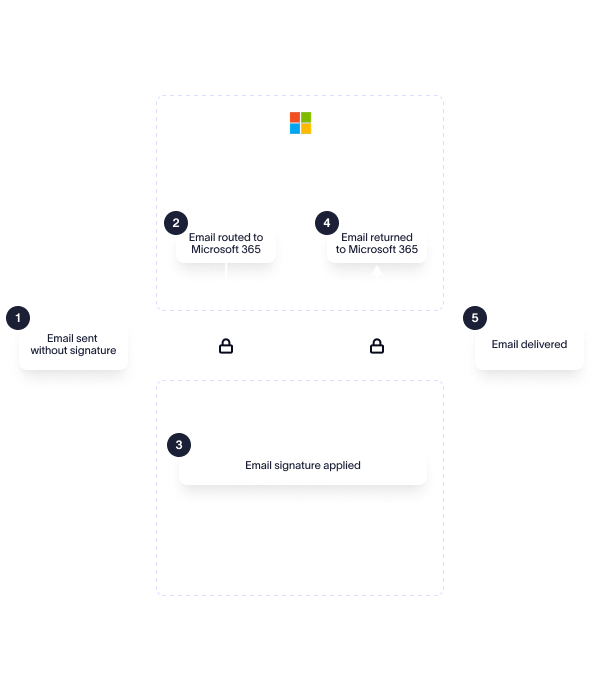
How Exclaimer deploys across Microsoft 365
Exclaimer connects through native Microsoft 365 connectors. From there, two ways to apply email signatures, used together or on their own.
An Outlook add-in shows email signatures while composing, which reduces format tickets and user confusion.
Usually run alongside Cloud deployment: client-side preview plus server-side enforcement.
Common ways to use Exclaimer
Brand campaigns and dynamic banners across all outbound email
Legal and regional disclaimer routing
Role-based email signatures for sales, support, and executive teams
Multi-brand and multi-tenant management, including post-merger consolidation
:format(webp)/)
Stay compliant and on brand
Governance and compliance, applied to every email
Exclaimer keeps brand and legal standards consistent across Microsoft 365. Signature elements can’t be edited or removed by users, and governance runs without anyone policing it by hand.
That control is backed by independent certifications, and the documentation security and procurement teams ask for already exists, so approval moves faster.

Brand control, without the IT ticket
Marketing owns how every email signature looks. Refresh a campaign banner or roll out new branding after a rebrand, and it reaches every mailbox without raising a ticket.
IT still controls who can change what, so brand teams move fast inside guardrails they don’t have to manage.
What Exclaimer customers say
“What used to require me to manually code changes for every signature update is now completely automated. We’ve had zero issues since going live, and it’s taken the manual deployment work off my plate entirely.”
Tom Coles, Network Systems Development Engineer, City of Bristol College
1,000+
staff with consistent email signatures
3 organizations
deployed in 5 days

“Our marketing team now has complete independence to manage quarterly campaigns and brand updates. Getting Exclaimer on board before our rebrand made all the difference, and we now have brand consistency across all 2,600 users.”
Sophie Pluck, Senior Marketing Specialist (Brand), Vancity
2,600
users
100%
adoption

What IT and marketing teams say

"Whether your company is small or large, if you use Office 365 it's a no-brainer. It's so simple to set up and allows total peace of mind that your brand image is being upheld across your company."
IT & Business Systems Manager, Small-Business
"Exclaimer is feature rich, simple to use and just works! It integrates well with Exchange and Office 365 and I don't know anything else on the market that works as well. It just works!"
Marketing Manager, Mid-Market
"If you look for an easy signature tool that works fine with office 365, then you do everything right if you are willing to use this product. It is straightforward to set up, use, and configure everything."
Information Technology Specialist, Small-Business
"I really appreciate how Exclaimer locks in brand consistency across the board. It works great with Microsoft 365 and Azure AD, so our contact details update automatically without needing to chase anyone down.”
Marketing Manager, Mid-Market
"The centralized signature management is a game changer, no more running around to change the signatures in Outlook and no more inconsistent logo usage throughout the company.”
Regulatory Compliance Officer, Small-Business
“Exclaimer is a solid, reliable solution with easy Microsoft 365 integration. The user interface is clean and easy to navigate. Creating and managing signatures is straightforward, even without much prior experience.”
Information Technology Infrastructure Consultant, Enterprise
"The interface is so simple and easy, getting started was a breeze and linking into our Office 365 tenant stress-free, just a couple of clicks."
Director, Small-Business
Frequently asked questions
Up to a point. Mail flow rules can vary content using directory attributes, but the conditions are hand-built, limited to basic fields, and break as the directory changes. Exclaimer’s Signature Rules assign the right email signature from Microsoft Entra ID attributes like department, region, or role, and reassign it when someone moves team.
A mail flow disclaimer applies the same plain-text wording to everyone, with no routing by jurisdiction. Whether that meets your obligations depends on your regulators. Exclaimer routes disclaimers by jurisdiction or business unit.
Microsoft 365 can’t lock a client-side email signature, so whatever a user sets in Outlook is what sends. The only reliable way to enforce one is to apply it server-side, after the message leaves the user, where their local setting no longer matters. Exclaimer does this on every send.
Natively, each tenant or domain keeps its own mail flow configuration, maintained separately, so a merger adds admin work with every entity. Exclaimer manages email signatures across multiple tenants and domains from one console, with separate brand sets per entity, so you can run both brands or move from one to the other.
Edit the email signature once in Exclaimer and every mailbox uses the new version on its next send, with nothing for staff to do. With native tools, you either edit the mail flow rule, which never touches client-side email signatures, or redistribute a template and rely on each person to apply it.
A mail flow rule adds its text as the message passes through the server. Microsoft’s disclaimer action only appends to the bottom of the message or prepends to the top, so in a reply it lands below the whole thread rather than under your latest reply. Exclaimer applies the email signature server-side in the right position, under the latest message, on every send.
Give Exclaimer a try
Related resources