Dave is a marketing expert with 15 years experience in the tech and SaaS world. He specializes in educating IT and channel audiences, with a focus on security, privacy, compliance, and marketing technology. With a talent for storytelling and a deep understanding of the industry, Dave transforms complex IT topics into clear, engaging, and impactful narratives.
Microsoft 365 Copilot governance: What admins actually need to control
TL;DR
Turning on Microsoft 365 Copilot is simple, but it widens what IT is accountable for governing across the tenant.
Copilot is only as safe as your existing access permissions, because it inherits them exactly and can surface content a user was never meant to see.
Effective Copilot governance starts with auditing access permissions and sensitivity labels, training users to review AI output, and controlling connectors and plugins.
Tenant governance settings stop at the point a message is sent, so they don’t control whether your outbound email is consistent, accurate, and compliant.
The outbound layer is the governance gap most organizations leave open: only 18% manage email signatures centrally.
Centralized email signature management closes that gap, applying consistent, compliant signatures, branding, and disclaimers to every message that leaves Microsoft 365.
Turning Copilot on across your Microsoft 365 tenant is straightforward. Working out what you’re now accountable for governing isn't. Once an AI assistant can read and generate content across your organization, the boundary of what IT controls moves.
Microsoft 365 Copilot governance is the set of policies, controls, and processes organizations use to manage how the AI assistant accesses, generates, and surfaces content across their tenant.
For most admins, the first Copilot questions are operational. Which licenses do we need, who gets them, and how do we switch them on? Those matter. But the bigger question is this: once Copilot can touch almost everything in the tenant, what are we actually responsible for controlling?
That question is about to get more pressing. According to Exclaimer’s State of Business Email 2025 research, 43% of IT leaders said they expect AI-driven email automation to dominate within five years. AI won’t stay inside Word and Excel. It’s moving toward email, the channel most organizations rely on more than any other, and governance has to keep up.
This guide is for IT administrators, security teams, and compliance officers responsible for Microsoft 365 governance who need to understand both the internal controls and the outbound communications layer that tenant settings don't reach.
Top 5 Microsoft 365 Copilot governance risks |
|
What does Microsoft 365 Copilot actually do?
Copilot is a generative AI assistant built into the Microsoft 365 apps your employees already use, drawing on your organization’s own data to answer questions and produce content.
Copilot sits inside the apps rather than alongside them. In each one, it takes on work that used to be manual:
App | Function | Governance implication |
|---|---|---|
Outlook | Summarizes long email threads, surfaces messages needing attention, drafts replies in chosen tone and length | Can access and summarize any email the user has permission to view |
Word | Drafts and rewrites documents, builds new documents from content in other files | Can pull content from any accessible file across the tenant |
Excel | Answers plain-language questions about datasets, identifies trends, generates visualizations | Surfaces data patterns that may include sensitive information |
PowerPoint | Turns Word documents into slide decks with speaker notes, tightens existing presentations | Aggregates content from multiple sources into shareable formats |
Teams | Recaps meetings, drafts agendas from meeting history, flags follow-up owners | Accesses meeting transcripts and chat history based on user permissions |
Here’s what makes this a governance question rather than a feature list. Copilot doesn’t draw on a generic model of the world. It draws on your tenant: your emails, your files, your meetings. That’s exactly what makes it useful. It also means Copilot is only ever as well-governed as the permissions and policies sitting underneath it.
Is Microsoft 365 Copilot safe to use in my organization?
“Is Copilot safe?” is usually the first question a CISO or IT leader asks. Microsoft’s answer is reassuring: Copilot respects the same access permissions as the rest of Microsoft 365, and it doesn’t use your data to train its underlying model. Both points are accurate, but neither one settles the question on its own.
That’s because “safe” depends less on Copilot than on the environment you point it at. Copilot inherits your access permissions exactly as they stand. Where those permissions are accurate, Copilot reflects that. Where they’ve drifted over years of folder sprawl, forgotten shares, and over-broad groups, Copilot reflects the drift just as faithfully.
This creates a specific governance risk. A document with misconfigured access might sit unnoticed for years, simply because no one happens to navigate to it. Copilot removes the “no one happens to” part. Ask it the right question, and it can surface content a user was never meant to see, not by breaking a rule, but by following the permissions already in place. Security teams call this Copilot oversharing, and it's the single most cited Copilot governance risk in practice.
So the real questions behind “is Copilot safe?” have little to do with Copilot:
Access permissions: Are your content access rights and sensitivity labels accurate, or assumed to be?
Output review: Do users know Copilot’s output can be wrong, and that anything drawn from internal sources needs checking before it’s shared externally?
Extension points: Have you accounted for Graph connectors and third-party plugins, which let Copilot reach data beyond Microsoft 365?
None of this is a reason to avoid Copilot. It’s the groundwork that makes adopting it defensible. Copilot doesn’t raise or lower your governance standards. It enforces whatever standard your tenant already reflects.
Key terms |
|
How do I govern Microsoft 365 Copilot as an IT admin?
Governing Copilot properly means building a real framework: access reviews, sensitivity labels, connector controls, and user training. It’s worth being precise about where that framework ends, because the boundary sits in an easy place to overlook.
Everything you configure in the Microsoft 365 admin center and the Purview portal governs how Copilot reads, generates, and surfaces content inside your tenant. Sensitivity labels, retention policies, audit logs, and connector permissions all control what happens to content while it lives within Microsoft 365.
What data can Microsoft 365 Copilot access?
Tenant governance controls:
Access permissions and who can view content
Sensitivity labels and content classification
Retention policies and data lifecycle
Audit logs and compliance reporting
Graph connectors and plugin permissions
What Copilot can access and generate internally
Tenant governance doesn't control:
- Email signature content and formatting
Brand consistency in outbound messages
Legal disclaimers on sent emails
Contact detail accuracy in signatures
Compliance of communications once they leave Microsoft 365
That’s the correct scope for tenant governance. It’s also where it stops.
Does Microsoft 365 Copilot governance cover outbound email?
Every email your employees send carries your brand, your contact details, and often a legal disclaimer. It represents the organization the moment it lands. Yet in most companies, this outbound layer is governed far more loosely than the content sitting inside the tenant.
The content doesn't stay in the tenant, though. A large share of it leaves by email, going to customers, partners, regulators, and the public. Once a message leaves, your Copilot governance settings don't travel with it, and the sensitivity label doesn't follow it out the door. That's the gap: tenant governance controls what AI does with your content inside Microsoft 365, but it says nothing about whether what you send out is consistent, compliant, and on brand.
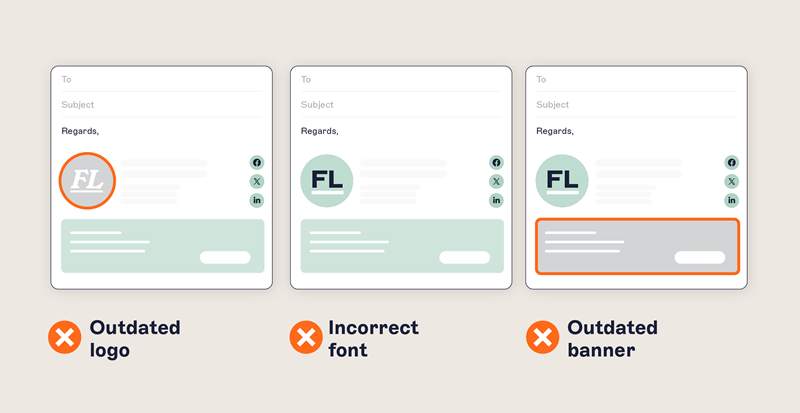
Look at what’s in a single outbound email beyond the message itself. An email signature with a name, title, and contact details that need to be current. Brand presentation: logo, colors, and formatting. Often a legal or regulatory disclaimer that has to be correct for the recipient’s jurisdiction. None of this is governed by your Microsoft 365 Copilot settings, and in most organizations, none of it is governed centrally at all.
The numbers from Exclaimer's State of Business Email 2025 research show how wide the gap runs. 92% of IT leaders agree that consistent, well-managed email signatures build trust and professionalism, yet 80% still rely on manual methods or user self-service to manage them. The same research found only 18% of organizations use centralized email signature management, even though 35% name it as one of their top two most time-consuming email tasks.
Centralized email signature management closes that gap. Applied centrally, an email signature stops being a personal preference and becomes a policy-driven part of every message: current contact details pulled from your directory via Directory Sync, approved branding employees can't alter thanks to Brand Kits and Role-Based Access Control (RBAC), and Disclaimers applied automatically through Signature Rules for the right region or audience.
Exclaimer is the established platform for this layer, used by more than 80,000 organizations across 25 years of email signature management. Its Microsoft 365 cloud solution applies signatures, branding, and disclaimers centrally and automatically, so every message that leaves meets the same standard, no matter who or what drafted it.
What does a Microsoft 365 Copilot governance checklist look like?
Governing Copilot well comes down to a handful of deliberate actions taken before and during rollout. Most are things a well-run IT team is already doing. Copilot raises the stakes on getting them right.
Treat this as a starting framework rather than a complete list. The specifics will depend on your environment, your regulatory obligations, and your risk appetite.
1. Audit access permissions and sensitivity labels
Before Copilot goes live, review who can access what. Look for over-broad groups, forgotten shares, and documents whose permissions no longer match their sensitivity. Copilot follows these permissions exactly, so any inaccuracy becomes a live exposure the moment it’s deployed. Confirm your sensitivity labels are applied consistently, not just defined on paper.
2. Train users to review AI output
Copilot’s output can be wrong, incomplete, or drawn from a source the user didn’t expect. Make it clear that anything Copilot generates needs human review before it’s acted on, and especially before it’s shared outside the organization. A short, practical training session does more here than a written policy nobody reads.
3. Govern connectors and plugins
Graph connectors and third-party plugins extend Copilot’s reach to data beyond Microsoft 365, including CRMs and other external systems. Treat every extension as a deliberate decision. Review what each connector exposes, who approved it, and whether it widens Copilot’s access in ways your governance hasn’t accounted for.
4. Bring the outbound layer under central control
Tenant governance stops at the point a message leaves. Govern your email signatures, branding, and disclaimers centrally rather than leaving them to individuals, so every outbound email is consistent, accurate, and compliant by default. This is the part of the governance picture that tenant settings don’t reach, and the part your recipients actually see.
Governance checklist summary |
|
What's the bottom line for IT teams governing Copilot?
The real question was never whether to adopt Microsoft 365 Copilot. For most organizations, AI in the productivity stack is already arriving. What matters is whether your governance reaches everything Copilot now touches.
Copilot makes your tenant more capable, but more exposed wherever the foundations underneath it are weak. Get your access permissions right, train your users, and govern your connectors, and you’ve covered the internal side of the picture. That’s where most Copilot governance advice begins and ends.
The content doesn’t stay inside the tenant, though. It leaves by email every day, in high volume, under your organization’s name. Governing what you send is part of the same accountability, not a separate concern to hand off elsewhere. When email signatures, branding, and disclaimers are controlled centrally, every message that leaves meets the standard you set, regardless of who or what composed it.
That’s the full scope of governance in the AI era. Your tools generate content inside the tenant, and your organization remains accountable for everything that leaves it under its own name.