Dave is a marketing expert with 15 years experience in the tech and SaaS world. He specializes in educating IT and channel audiences, with a focus on security, privacy, compliance, and marketing technology. With a talent for storytelling and a deep understanding of the industry, Dave transforms complex IT topics into clear, engaging, and impactful narratives.
Email disclaimer management for IT teams at scale
Legal disclaimers are one of the most common tools for email compliance, and one of the most inconsistently applied. A recent Navex report found that 83% of compliance professionals say staying aligned with regulations is critical to business decisions, yet disclaimers are still handled manually in many organizations.
Whether it's a missing confidentiality line, an outdated business address, or the wrong language version, even small issues introduce risk. And when something breaks, it's usually IT that's tasked with fixing it.
Exclaimer’s recent webinar explored a better way to manage email disclaimers across the organization. The session introduced our new Disclaimers feature and walked through how IT and compliance teams can reduce risk and simplify control without relying on template edits or user input.
Below, we break down what was covered and how teams can apply it.
1. Legal disclaimers still matter for compliance
Legal disclaimers play a visible role in showing that an organization takes compliance seriously. They clarify responsibility, support confidentiality, and meet legal expectations that vary by region. When applied consistently, they help demonstrate control over business communications.
Most regulations don't require disclaimers outright. But many expect companies to show that they're managing risk, especially in how they handle email. A clear, consistent email disclaimer makes it easier to show that intent.
And when disclaimers are missing, inconsistent, or outdated, it reflects poor oversight. That may not result in a penalty, but it can raise questions during an audit. Strong policies matter, but so does what's actually being sent every day.
2. Disclaimer management is still difficult
Email disclaimer management often relies on outdated processes. For them to be effective, disclaimers are either directly embedded into email signature templates, multiple versions need to be maintained across teams, or end users are asked to handle updates manually. However, when disclaimer text needs to be updated, it's often IT that needs to make changes across every template and confirm it's been applied correctly.
This creates delays and increases the risk of inconsistency. Disclaimer content may get missed on mobile clients, vary by device, or disappear entirely if an email signature fails to apply. There's no easy way to check what messaging went out or catch issues before they're noticed externally.
As companies grow or operate across different regions, these problems multiply. More teams mean more templates, more risk, and less control.
3. How Exclaimer helps teams manage email disclaimers
The Disclaimers feature is available to customers on Exclaimer's Standard and Pro plans. It gives IT and compliance teams a central place to manage legal messaging across the business. There's no need to maintain separate templates or rely on users to apply the right content.
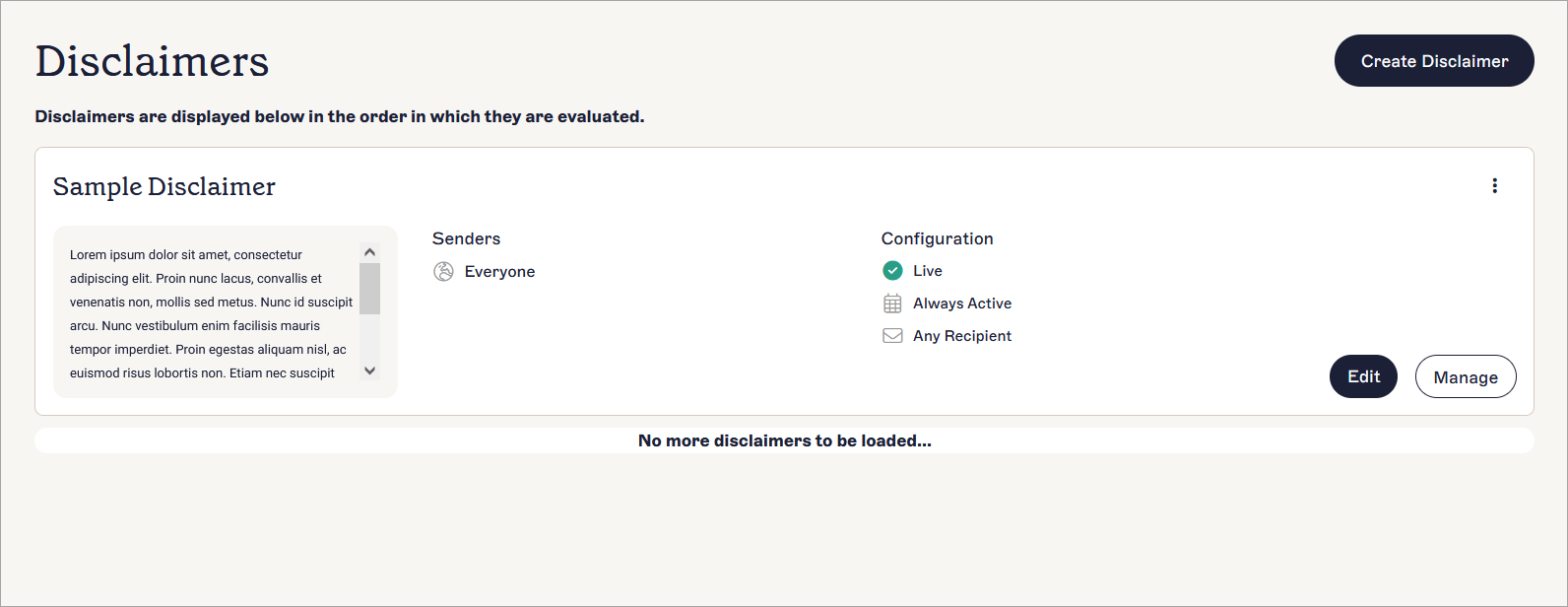
You can assign email disclaimers based on department, location, domain, or language. Rules make sure the correct message is applied automatically. When legal updates the wording, you update it once, and the change applies to all relevant users.
A built-in preview tool shows how disclaimers appear alongside signatures and banners. This helps you catch layout or formatting issues before anything goes live.
Setup is simple. Everything is managed in the same platform as your email signatures. IT can make updates quickly and test changes with full visibility.
The feature works with Microsoft Entra ID, Google Workspace, and Okta. Rules update automatically as user details change. It also meets Exclaimer's platform standards for data handling and operational control.
4. How teams can apply disclaimers with Exclaimer to meet real requirements
The webinar shared how different organizations can use the Disclaimers feature to reduce risk, simplify control, and meet legal obligations. Each use case shows how rule-based targeting can replace manual work and give teams more certainty over what’s being sent.
Healthcare: Apply disclaimers by department. A U.S. healthcare provider applies HIPAA disclaimers only to external emails sent by clinical staff. Internal messages remain clean. IT doesn’t manage multiple versions or handle exception requests.
Legal: Assign disclaimers based on role. A legal firm sets different email disclaimers for legal and HR teams. Legal emails include language about confidentiality and privilege. HR uses a separate version. Rules manage this without extra templates.
Manufacturing: Localize content by region. A global manufacturer applies region-specific disclaimers in the correct language. Teams in the UK, Germany, and the U.S. each send emails with local legal content. This setup avoids duplication and simplifies updates.
Multi-brand: Target by domain. A parent company with multiple brands applies different email disclaimers to each domain. Every brand has tailored legal messaging. All legal disclaimers are controlled in one place, with no need to manage separate systems.
These examples show how centralized email disclaimer management gives teams better coverage and flexibility without increasing overhead.
5. Practical tips for getting email disclaimers right
Exclaimer makes it easy to manage disclaimers, but getting them right depends on how they’re maintained. These best practices help ensure your email disclaimers stay clear, compliant, and consistently applied.
Focus on what's necessary. Include only the legal messaging that's required. Overly long disclaimers can confuse recipients and make it harder to communicate intent. Keep the language simple and direct.
Make ownership clear. Legal teams are responsible for writing the disclaimers. Compliance confirms alignment with regulation. IT handles setup and delivery. Brand reviews layout and tone. When these roles aren't defined, updates slow down or go out incorrectly.
Apply rules to control scope. Use targeting to match legal disclaimers to the right users. Rules can assign content based on region, department, or domain. This avoids clutter and keeps messages relevant.
Always preview before publishing. Use preview tools to check how disclaimers appear in real email signatures. It helps avoid layout issues or incorrect logic that can undermine your message.
Review them regularly. Email disclaimers should be checked every quarter. This means they'll stay aligned with regulatory requirements and reflect current policy.
6. How to audit email disclaimers for HIPAA compliance
94% of IT leaders told Exclaimer's State of Business Email 2025 survey they're confident in their compliance posture across HIPAA, GDPR, SOC 2, and ISO 27001. Only 47% called themselves very confident, and that gap is exactly what a HIPAA audit exposes.
Covered entities and business associates handling protected health information by email need compliant disclaimer language under 45 CFR §164.530. That includes evidence that it's actually applied, not just assumed. The step-by-step procedure below gives IT and compliance a quarterly audit that produces that evidence. It isn't a substitute for a full HIPAA Privacy Rule compliance review.
Inventory mail domains:
Pull every mail domain in tenant scope, whether that's Microsoft 365 or Google Workspace, and record the count.
Output: A domain inventory list with an owner assigned to each domain.
Pull the current disclaimer per template:
From your Exclaimer admin console, export every active email signature template and the disclaimer text it carries.
Output: A template-to-disclaimer-text mapping table.
Map templates to PHI-handling roles:
Identify which email signature templates apply to staff who handle protected health information (clinicians, billing, patient services, and IT staff with PHI access), using Microsoft Entra ID or Google Workspace Directory group membership to make the connection (how Exclaimer reads group data).
Output: A role-to-template matrix.
Verify disclaimer language against 45 CFR §164.530:
Confirm each template assigned to a PHI-handling role includes three required elements:
A statement that the email may contain protected health information
Instructions for an unintended recipient
A prohibition on further retention or disclosure.
Output: A pass or fail result per template.
Sample test sent mail:
Pull a random sample of 25 to 50 outbound emails per PHI-handling role over a 7-day window. Use Microsoft 365 message trace or your platform's equivalent, and confirm the disclaimer is applied on each one.
Output: A sample-test log with a pass rate.
Document the audit:
Record the date, scope, sample size, findings, remediation items, and sign-off. Retain the record per HHS retention guidance.
Output: A signed audit report.
Schedule the recurring audit:
Run it quarterly at minimum, and trigger an ad-hoc audit whenever a template changes or a new PHI-handling role is created.
Output: A recurring calendar entry with a named owner.
Quarterly is the minimum cadence. Many covered entities run a lightweight monthly sample test on top of it.
For Exclaimer's HIPAA position, see Exclaimer's HIPAA compliance page. For wider healthcare practice, see the healthcare industry page.
7. What's next for your team
Legal disclaimers are a key part of email compliance. But managing them through templates or leaving updates to individual users creates risk. Exclaimer gives IT the ability to apply legal messaging consistently, with less effort and more control.
If you're already on a Standard or Pro plan, the Disclaimers feature is available in your account. You can start building and applying rules right away.
If you're on a legacy or Starter plan, talk to your account manager about upgrading. That also gives you access to other platform features including email signature targeting, CRM integrations, and scheduling.
If you're new to Exclaimer, book a product demo to see how centralized email disclaimer management can work in your setup.