Karl heads up Information Security at Exclaimer, where he’s focused on keeping data secure and ensuring compliance with standards like ISO 27001 and SOC2. With years of hands-on experience, Karl is dedicated to simplifying security processes and staying ahead of potential threats. He’s passionate about using automation and smart practices to strengthen security without adding unnecessary complexity.
Email accessibility and the law: Where the legal exposure actually sits

Many CRM platforms already block a marketing email that fails basic accessibility checks. Nothing stops the same failures in the email every employee sends today.
In a lot of CRM setups, you can't send a marketing campaign that fails basic accessibility checks. The platform blocks it outright. Alt text, contrast, and screen reader labels became non-negotiable for marketing years ago, mostly because legal teams and email service providers forced the issue. Everyday business email never went through the same process. Nobody's blocking a non-compliant reply, a forwarded thread, or an email signature. That gap is where the legal exposure now sits.
That was the focus of "Email Accessibility and the Law," a recent Exclaimer webinar moderated by Caleb White, Product Marketing Manager, with Ed Bodey, General Counsel, and Amelia (Millie) Creswell, who runs CRM and lifecycle marketing at Exclaimer. Here are the key takeaways.
The legal picture is bigger than most teams think
Every major accessibility law traces back to the same WCAG baseline, whether or not it mentions email by name. Enforcement is already reaching past websites into everyday digital communications.
That exposure has a name, or rather five of them. ADA Title II and Title III, Section 508, the European Accessibility Act, the UK Equality Act, and their equivalents in Canada and Australia: none mention email specifically. Every one of them traces back to WCAG (the Web Content Accessibility Guidelines), the common baseline across every regime.
WCAG compliance work has traditionally focused on websites and product interfaces, the parts of the business a user interacts with directly. That's shifting, Ed said: enforcement actions are showing up across digital communications more broadly, not just public-facing websites. Email sits squarely among the channels that traditional focus left behind.
Federal funding adds another layer: organizations that take government funding can find themselves pulled into these requirements through that relationship alone, regardless of sector. Add in a run of compliance deadlines and legal decisions that have already brought private-sector digital communications into scope, and everyday business email is inside that exposure too.
Ownership defaults to whoever gets scrutinized first
Nobody sits down and assigns accessibility ownership. It lands on whichever team faces regulatory pressure first, and today that's marketing.
It depends on the organization, Millie said, but marketing usually ends up owning accessibility first, because regulators and legal teams scrutinize marketing email long before anyone looks at what employees send. Business email hasn't faced the same pressure, so no one has claimed it. She frames it as a job for multiple teams working together, each bringing expertise the others don't have.
Whoever owns the tool driving email disclaimers or email signatures should own the process, in Ed's view, whether that's marketing or a centralized IT function. The harder part is what happens once ownership is settled, when the fight becomes about what goes in the text: marketing brand language and specific legally required wording both competing for space in the same email signature.
Blind spots beyond alt text
A hyperlink with no screen reader label carries no information about where it goes, whether that's a meeting invite or a company's social page. Alt text doesn't cover that gap.
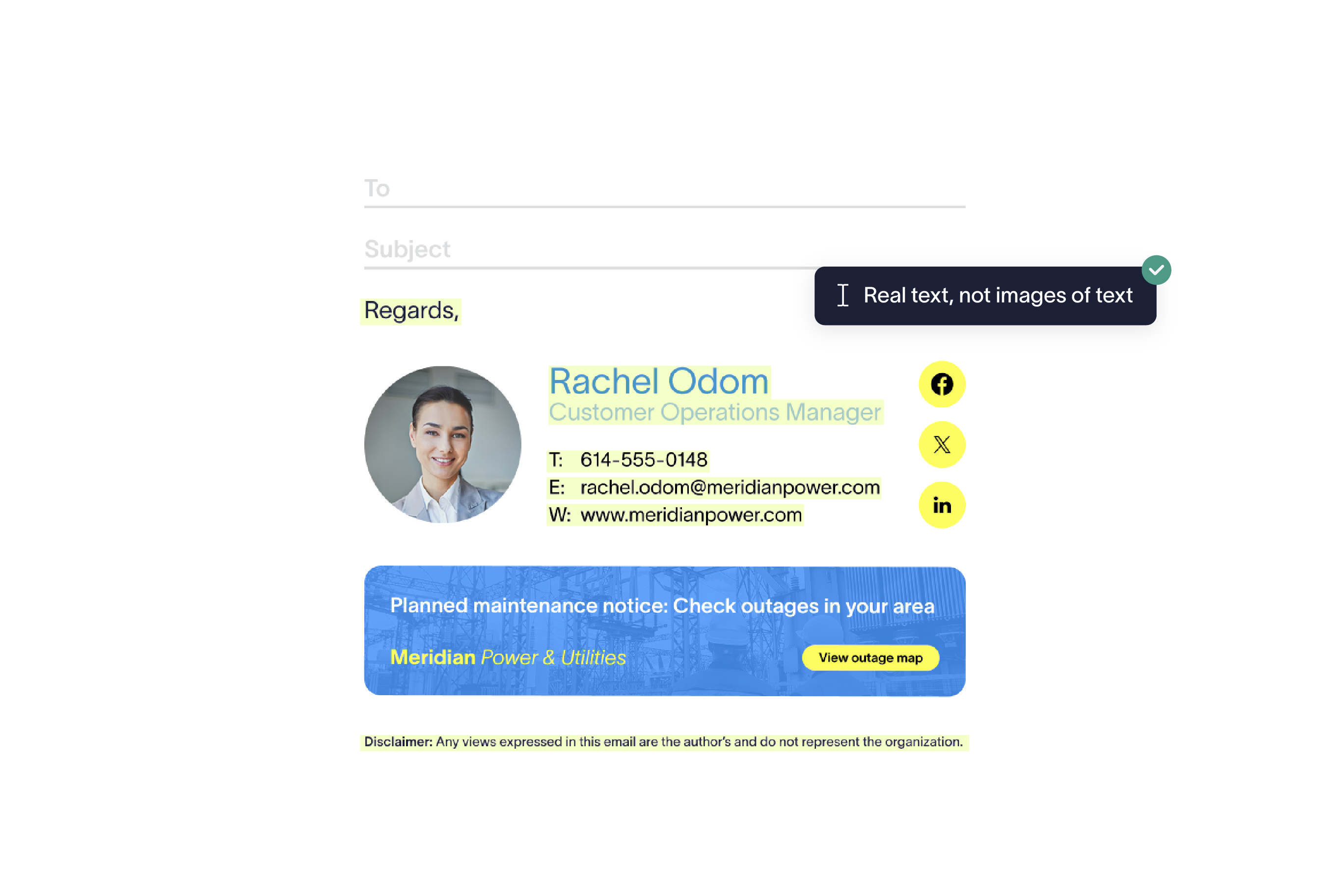
Alt text and color contrast are the two things everyone's heard of by now. His list of what still gets missed runs longer: hyperlinks, calendar booking links, social icons, QR codes.
A QR code is a single point of access. Someone who can't scan one, or who's visually impaired, has no way in unless there's a separate route to the same content, such as a clickable link placed next to the code.
Hyperlinks have the same problem in a different shape. Alt text is something you add to an image; a link needs its own label, or a screen reader just announces "link" and stops there. Nobody thinks to check it the way they check alt text.
Building one accessible email signature isn't hard. Hard-code it once and move on. The real difficulty shows up at scale: keeping hundreds of thousands of individual email signatures accessible across a whole organization as people join, leave, change roles, and campaigns rotate. That's the case for a centralized tool like Exclaimer, consistency across the organization without relying on one person to catch every change.
Using Exclaimer doesn't make an organization accessible by default, Caleb said. Compliance depends on how the tool actually gets configured and used.
The business case goes beyond the legal one
Public sector, education, finance, and healthcare already treat accessibility as a procurement gate: fail it, and the deal doesn't happen. Outside those sectors, the same failure shows up as lost reach and email that performs worse.
The business case, Ed said, runs past risk avoidance alone. Two separate pressures converge on those sectors: litigation risk, and accessibility functioning as a straight procurement requirement rather than a nice-to-have. Neither causes the other. They're two distinct reasons those industries move first.
Private industry carries the same exposure without the procurement gate. An inaccessible email signature still costs reach directly: part of the audience can't engage with it, and if it carries a call to action, they can't act on that either. Mail systems can also flag content that repeatedly fails basic accessibility checks the same way they flag spam, adding a deliverability cost on top of the lost reach.
Millie made a related but separate point, which is to treat accessibility as a deliverability and reach problem that shows up on every send, and it stops needing its own budget line. It becomes a normal part of the email work already happening. An email signature with poor contrast and messy structure performs worse for the entire audience, not only the people relying on assistive technology.
Where to start: Audit, ownership, templates
Ed's team put a mobile banking app through more than fifty separate accessibility checks, sixteen years ago, well before most companies were having this conversation at all. Business email deserves the same audit discipline today.
Ed treated that project as his benchmark for what a serious accessibility audit looks like. His starting question for any organization is simpler: what are you actually trying to achieve. If the goal is WCAG compliance across internal and external operations, break that down by priority area first, and don't lose track of whatever gets marked lower priority once the project is underway.
Anyone who's audited data across an organization has done this part before: find every touch point. Business email is one of them, easy to miss because it doesn't look like the rest of the estate.
Where an organization already stands can depend on the sector. Ed pointed to banking and healthcare as sectors that move first, since they deal directly with more vulnerable parts of the population. Education fits the same pattern.
Once the audit's scope is set, the practical question is tooling: something that removes the friction of applying changes across the whole estate, so a fix doesn't mean asking several different teams to carry out the same change separately.
For Millie, the fix is simpler: bake accessibility requirements into the core templates themselves, for email generally and email signatures specifically, so anyone cloning or building from them inherits compliance automatically instead of depending on someone to remember a checklist. Pair that with enablement so the teams actually building email signatures understand why it matters and how to check their own work.
The mistake marketing already made once
Plain text generators and auto-built mobile layouts both promised to save Millie's team time. Neither produced something accessible without a person checking it by hand first.
Her team's old CRM system auto-generated a plain text version of every email, meant to help someone reading with a screen reader or with images turned off. What it produced was, in her words, complete nonsense. The team rewrote it by hand every time.
Building for mobile broke the same way. Design an email for desktop, and the platform would auto-generate a mobile version, with the colors and sizing off and a structure that didn't hold together, needing a person to fix it by hand.
Don't trust the default, Millie said: use the generator, but always check the output the way an actual person would read it. Skipping that check can end up costing more time than it saves, once you account for what wasn't accessible or usable in the first place.
How Exclaimer closes the gap
Exclaimer holds ISO 27001, ISO 27018, and SOC 2 Type II certifications and keeps audit-ready compliance records, the kind of evidence Ed says accessibility is starting to require before a deal even closes.
Exclaimer is the global leader in email signature management for Microsoft 365 and Google Workspace, trusted by more than 80,000 organizations worldwide, including Sony, Bank of America, the BBC, and the Academy Awards.
Signature Rules apply automatically across every user and device. An accessibility fix, whether that's a corrected screen reader label or an updated contrast value, reaches every employee's email signature the same way, without depending on each employee to update their own email signature correctly, or at all.
The caveat from earlier still applies: configuration is what turns that capability into actual compliance, the same lesson Millie's plain-text and mobile examples taught the hard way. One configuration applied everywhere means that check happens once, for the whole organization.
Reputation risk doesn't wait for a fine, either, Ed said: a visible accessibility failure can become a social media story, and no compliance report undoes that kind of damage.
Watch the webinar on demand
The full recording includes the audience Q&A, including how private-sector organizations ended up inside regulations that were originally written for public bodies.
Watch the webinar on demand or book a demo to see how Exclaimer applies Signature Rules consistently across your organization.